
Why Do USB-C Cables Stop Working? 8 Common Causes and Solutions
USB-C cables usually stop working because of damaged connectors, broken internal wires, worn contact surfaces, dirt in the ports, excessive bending, poor-quality materials, electrical overload, or compatibility problems. Identifying the cause helps users decide whether to clean the connection, check the charger, or replace the cable.
Why Do USB-C Cables Stop Working?
A USB-C cable may work normally for weeks or months before it starts charging intermittently, disconnecting during data transfer, or failing completely. Sometimes the cable is damaged physically. In other cases, the problem comes from the charger, device port, or a mismatch between the cable’s capabilities and the intended application.
USB-C is a connector system, not a guarantee of a particular charging power or data speed. Different USB-C cables have different electrical, mechanical, and functional capabilities. The USB Implementers Forum (USB-IF) maintains separate compliance requirements for USB-C connectors and cable assemblies. Source: USB-IF
For consumers, understanding these differences can prevent unnecessary replacements. For wholesalers, distributors, and private-label brands, knowing the common failure points can help improve product quality and reduce customer complaints.
1. Damaged USB-C Connectors
Why does a USB-C connector stop working?
The connector is one of the most frequently handled parts of a charging cable. Repeated plugging and unplugging, pulling the cable by its wire, accidental drops, and sideways pressure can damage the connector or its internal connections.
Common warning signs include:
The cable only works when held at a certain angle.
Charging repeatedly starts and stops.
The connector feels loose in the device port.
The metal shell is bent or visibly damaged.
Data transfer disconnects when the connector moves.
A damaged connector may have worn contacts, deformed components, cracked solder joints, or damage where the cable attaches to the plug.
How can you fix a damaged USB-C connector?
- Disconnect the cable from the charger and device.
- Inspect the connector for bending, corrosion, or visible damage.
- Test another known-working cable with the same device and charger.
- If the connector is physically damaged or the connection remains intermittent, replace the cable.
Do not force a bent connector into the port or attempt to repair a damaged plug while it is connected to power.
How can manufacturers prevent connector failure?
Cable manufacturers should pay attention to connector dimensions, contact quality, soldering or termination processes, mechanical retention, and strain relief.
For B2B buyers, connector appearance alone is not enough. A reliable supplier should be able to explain how connector assemblies are inspected and how mechanical and electrical performance are validated.
2. Broken Internal Wires
Can a USB-C cable break inside without visible damage?
Yes. A cable can look normal on the outside while one or more internal conductors are damaged.
Copper conductors may fatigue after repeated bending, twisting, pulling, or crushing. The damage often occurs near the connector, where the cable repeatedly flexes during everyday use.
Typical symptoms include:
The cable works only when bent in a certain direction.
Charging stops when the phone is moved.
Data transfer fails intermittently.
The cable works for low-power devices but struggles under a higher load.
The cable stops working despite having no obvious external cuts.
The exact symptoms depend on which conductors are damaged. A cable may lose charging functionality, data connectivity, or support for a particular high-speed mode.
How can you fix broken internal wires?
Internal conductor damage is generally not a practical consumer repair. Replace the cable with one that meets the device’s power and data requirements.
To reduce the risk of recurrence:
Pull the connector body rather than the cable itself.
Avoid sharp bends close to the plug.
Do not close doors or drawers on the cable.
Avoid stretching the cable across walkways.
Use a cable of suitable length for the installation.
What should B2B buyers check?
For bulk orders, ask whether the factory conducts cable bending, swing, tensile, and continuity tests appropriate to the product design.
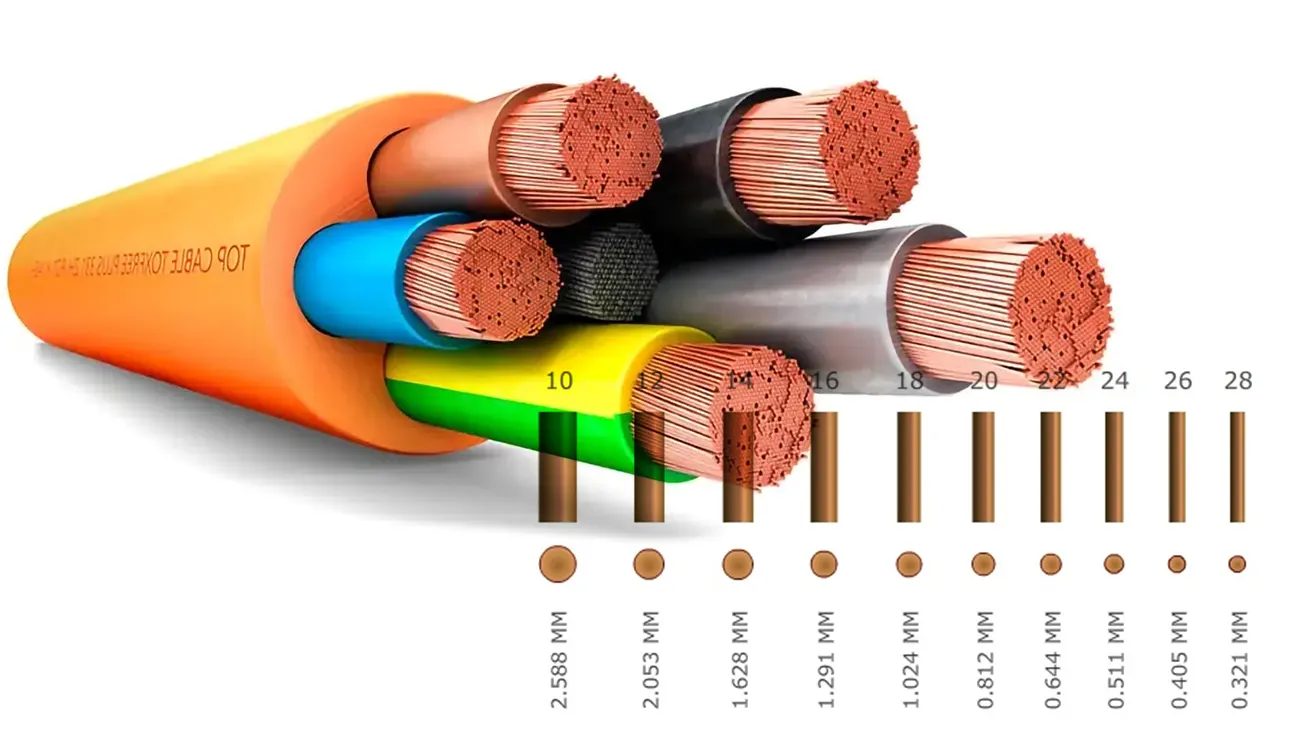
Wire gauge is also relevant. For a given conductor material and construction, a larger conductor generally has lower electrical resistance. However, AWG alone does not prove durability: strand construction, insulation, termination quality, and strain relief also matter.
3. Dirt, Dust, or Debris in the USB-C Port
Why does a USB-C cable work intermittently when the connector looks fine?
Lint, dust, and other debris can accumulate inside a device’s USB-C port. This may prevent the plug from seating fully or interfere with electrical contact.
Possible symptoms include:
The connector does not insert fully.
Charging is unreliable.
The plug feels loose even when it is not damaged.
The device connects only after repeated insertion attempts.
The issue may be in the device port rather than the cable itself.
How should you clean a USB-C port safely?
- Disconnect the charger and power source.
- Inspect the port under good lighting.
- Follow the device manufacturer’s cleaning instructions.
- Avoid metal tools, liquids, and forceful scraping.
- If debris is compacted or the port is damaged, seek professional service.
Do not push debris farther into the port or use a tool that could short the contacts.
Important: Before replacing a cable, test a known-working cable and inspect both the cable connector and device port. This helps identify which component is causing the problem.
4. Excessive Bending and Poor Strain Relief
Why do USB-C cables often fail near the connector?
The area where the flexible cable meets the rigid connector is exposed to repeated mechanical stress. If the design does not distribute that stress effectively, the insulation and conductors can deteriorate over time.
This problem is more likely when users:
Charge a phone while holding it at an awkward angle.
Bend the cable sharply at the plug.
Wrap the cable tightly around a charger.
Pull the cable out by its wire.
Use the device while the cable is under tension.
Strain relief helps spread bending forces over a longer section of the cable. Its effectiveness depends on the geometry, material, length, and overall construction.
How can you prevent bending damage?
For consumers:
Keep bends gradual rather than sharp.
Avoid pulling the cable sideways at the connector.
Use a suitable cable length.
Replace cables with cracked insulation or exposed wires.
For manufacturers, strain-relief design should be validated with appropriate mechanical testing. A longer strain-relief boot is not automatically better; the material and transition between the cable and connector also affect performance.
For premium OEM products, manufacturers can evaluate flexible TPE transitions, reinforced connector housings, and braided jackets. The complete design must be tested because no single material guarantees a longer service life.
5. Low-Quality Materials or Manufacturing Defects
Can a cheap USB-C cable stop working sooner?
It can. Poor materials or inconsistent manufacturing can increase the risk of early failure. However, price alone does not establish quality, and a higher-priced cable is not automatically more reliable.
Potential manufacturing problems include:
Inconsistent conductor dimensions.
Poor soldering or termination.
Weak connector retention.
Low-quality contact plating.
Insufficient insulation.
Inadequate strain relief.
Poor shielding or signal-integrity performance.
Incomplete electrical testing.
These problems may cause intermittent charging, overheating under inappropriate operating conditions, unstable data connections, or premature mechanical failure.
How can you identify a better-quality cable?
Look beyond appearance and packaging. Check whether the supplier provides clear specifications and relevant test evidence.
| Quality Factor | What to Check | Why It Matters |
|---|---|---|
| Conductors | Material, wire gauge, resistance | Affects voltage drop and electrical performance |
| Connectors | Dimensions, contacts, retention | Affects connection stability |
| Strain relief | Construction and mechanical performance | Helps resist repeated bending |
| Insulation | Material and rated properties | Supports electrical and mechanical safety |
| Power capability | Rated current and power | Helps match the cable to the application |
| Data performance | Supported USB data rate | Prevents incorrect performance claims |
| Quality control | Inspection and test records | Helps identify defects before shipment |
The USB-IF cable certification program covers cables intended for different USB capabilities and emphasizes that not all cables offer the same functionality. Buyers can consult the USB-IF Cables and Connectors program for relevant requirements.
6. Overheating or Electrical Stress
Can overheating damage a USB-C cable?
Yes. Excessive temperature can degrade insulation, connector materials, and internal connections. A damaged cable, poor electrical contact, unsuitable design, or operation outside its intended rating can contribute to overheating.
Warning signs include:
A connector becoming unusually hot.
Discoloration or melting near the plug.
A burning smell.
Charging repeatedly stopping under load.
Visible damage to the cable jacket.
A cable may feel slightly warm during use, depending on the application. However, unusual heat, a burning smell, smoke, or melting are warning signs that should not be ignored.
What should you do if a USB-C cable overheats?
- Stop using it and disconnect power if safe to do so.
- Do not continue testing a cable with visible heat damage.
- Check the charger, device port, and cable for signs of damage.
- Replace the damaged cable and have the charger or device inspected if the problem persists.
Do not assume that a cable with a high advertised wattage is suitable for every device or charging setup. The cable, charger, and device must work together within their supported specifications.
How can manufacturers reduce electrical risks?
Manufacturers should validate conductor resistance, connector contact quality, current capability, temperature rise, and relevant USB Power Delivery behavior where supported.
USB-IF maintains separate test requirements for USB-C cable assemblies and for Power Delivery functionality when a cable supports USB PD. See the USB-IF compliance information.
7. The Cable Does Not Support the Required Power or Data Performance
Why does a USB-C cable charge slowly or fail to transfer data?
Two cables can use the same USB-C connectors but support different power and data capabilities.
For example, a cable designed for USB 2 data transfer will not become a 10Gbps cable simply because both ends use USB-C connectors. Similarly, the maximum power available to a device depends on the capabilities of the cable, charger, device, and charging protocol.
Common compatibility problems include:
Expecting a basic cable to support high-speed data transfer.
Using a cable that does not meet the required charging specification.
Connecting a high-power device with an unsuitable cable.
Using a cable that does not support the required video or display functionality.
Assuming every USB-C cable supports every USB-C feature.
How can you solve a USB-C compatibility problem?
First, identify the required function: charging, data transfer, video output, or a combination.
Then check the specifications of the cable, device, and charger. Replace the cable only if it lacks the capability required for the application.
| Intended Use | What to Verify |
|---|---|
| Phone charging | Supported charging protocol and cable power capability |
| Laptop charging | Required power, current, and USB PD compatibility |
| Basic file transfer | Device and cable data support |
| High-speed data | Supported USB data rate and cable specifications |
| Video output | Device, cable, and display compatibility |
| Docking station | Power, data, display, and peripheral requirements |
For B2B buyers, the product specification should clearly state the supported power and data performance. Avoid descriptions such as “fast charging and high-speed data” without defined, tested performance criteria.
8. Charger, Device, or Software Problems Mistaken for Cable Failure
How do you know whether the cable is actually broken?
Sometimes the cable is fine. The real issue may be a faulty charger, damaged device port, incompatible accessory, software problem, or temporary system fault.
Common signs include:
Several cables fail with the same charger.
The cable works with another device.
The device does not recognize any cable.
Charging stops after a device update or configuration change.
A laptop port or USB hub cannot provide the required power.
How can you troubleshoot the problem?
Use this simple process:
- Test the cable with another compatible device.
- Test the original device with a known-working cable.
- Try a compatible charger or USB port.
- Inspect the device port for debris or damage.
- Restart the device if the manufacturer recommends it.
- Check the device’s charging and accessory guidance.
- If the problem persists across multiple known-working cables, have the device or charger inspected.
This process helps distinguish cable failure from a problem elsewhere in the charging system.
Quick Troubleshooting Guide: Why Is Your USB-C Cable Not Working?
| Symptom | Possible Cause | Recommended Action |
|---|---|---|
| Works only at a certain angle | Connector or internal wire damage | Replace the cable if damage is confirmed |
| Plug does not fit fully | Debris or port damage | Inspect and clean according to manufacturer guidance |
| Charging is slow | Charger, cable, or device capability mismatch | Check power specifications |
| Charging works but data transfer fails | Data conductors, device settings, or compatibility | Test data with a known-working cable |
| Cable disconnects when moved | Damaged connector or internal conductor | Replace the cable if intermittent contact persists |
| Connector becomes unusually hot | Poor contact, damage, or electrical stress | Stop using and inspect the complete setup |
| Multiple cables fail on one device | Device port, charger, or software issue | Test another compatible power source and seek service if needed |
| Cable fails soon after purchase | Possible defect or unsuitable application | Document the failure and contact the seller or supplier |
How Can USB-C Cable Manufacturers Reduce Failure Rates?
For USB-C cable manufacturers, preventing failures starts with design validation and continues through mass production.
1. Use Clearly Defined Product Specifications
Each product should have a documented specification covering:
Cable length and construction.
Connector type.
Conductor material and wire gauge.
Rated power capability.
Supported data rate.
Shielding requirements, where applicable.
Jacket and insulation materials.
Intended operating conditions.
A product should not be described as supporting a capability that has not been verified.
2. Inspect Incoming Materials
Incoming quality control can check connector dimensions, conductor specifications, insulation materials, and other critical components against approved requirements.
Material certificates and supplier records can help improve traceability.
3. Control the Assembly Process
Production controls should address wire preparation, termination or soldering, shielding, connector assembly, overmolding, and strain relief.
The exact process depends on the cable design and connector construction.
4. Perform Appropriate Electrical Tests
Depending on the product, testing may include:
Continuity and short-circuit checks.
Conductor resistance.
Voltage drop under load.
Charging and power-delivery behavior.
Data transmission.
High-speed signal integrity for applicable products.
Temperature-rise evaluation under defined conditions.
A basic continuity test is useful, but it does not establish that a cable meets every power, data, durability, or compliance requirement.
5. Validate Mechanical Durability
Suitable tests may include bending, swing, tensile, connector retention, and insertion/extraction testing. Test conditions and acceptance criteria should match the product’s design and intended use.
6. Keep Quality Records
For wholesale and private-label orders, suppliers should maintain relevant inspection records, test reports, production traceability, and corrective-action records.
For products claiming USB-IF certification, buyers should verify the specific product and certification information rather than relying on a general statement that a factory is “USB-C certified.”
Expert Quality Inspector: “When a USB-C cable fails, the visible symptom does not always reveal the root cause. A cable that disconnects during movement may have a mechanical defect, while one that charges but cannot transfer data may have a different electrical or compatibility issue. Reliable quality control combines clear specifications, electrical testing, mechanical validation, and traceable production records.”
What Should B2B Buyers Ask a USB-C Cable Supplier?
If you are sourcing USB-C cables for wholesale, distribution, or a private-label brand, use the following questions to evaluate a potential supplier.
| Question | Why It Matters |
|---|---|
| What power ratings does this cable support? | Helps match the cable to the target device |
| What data rate has been verified? | Prevents misleading speed claims |
| What conductor material and gauge are used? | Helps evaluate resistance and construction |
| What connector and strain-relief design is used? | Helps assess mechanical reliability |
| What electrical tests are performed? | Shows how performance is checked |
| What durability tests are performed? | Helps assess resistance to repeated use |
| Can you provide relevant compliance documents? | Supports product verification and market requirements |
| Can you customize length, jacket, color, logo, and packaging? | Supports OEM and private-label requirements |
| How are failures investigated? | Shows whether the supplier can identify and correct root causes |
A reliable supplier should be able to explain the product’s specifications, quality controls, and limitations in clear technical terms.
FAQ: Why Do USB-C Cables Stop Working?
1. Why does my USB-C cable only work when I bend it?
This usually suggests a damaged connector, a broken internal conductor, or a loose connection. Stop bending it to maintain contact, as continued use may worsen the damage. Replace the cable if the problem persists.
2. Why does my USB-C cable charge but not transfer data?
Some cables are designed primarily for charging, while others support data transfer at defined speeds. The issue can also come from a damaged data conductor, device settings, or an incompatible USB port. Check the cable’s specifications and test it with a known-working data cable.
3. How long should a USB-C cable last?
There is no single service life for all USB-C cables. Lifespan depends on materials, construction, usage frequency, bending, storage, operating conditions, and manufacturing quality. A properly designed and validated cable should meet its defined durability requirements, but no cable is immune to wear or accidental damage.
4. How can I choose a reliable USB-C cable for bulk purchasing?
Define the required power, data rate, length, connector configuration, materials, and intended application before requesting quotations. Ask suppliers for relevant electrical and mechanical test reports, compliance documentation, and details of their quality-control process. Compare verified specifications and product consistency rather than price alone.
Conclusion
USB-C cables stop working for several reasons, including connector damage, broken internal wires, dirty ports, excessive bending, poor manufacturing, overheating, capability mismatches, and faults in the charger or device.
The best solution is to identify the cause before replacing components unnecessarily. For manufacturers and B2B buyers, the long-term solution is to select the correct cable specification, use reliable materials, validate electrical and mechanical performance, and maintain consistent quality control.
A USB-C connector does not guarantee that every cable offers the same durability, charging capability, or data performance. Clear specifications and appropriate testing are essential for producing cables that meet customer expectations.
USB cable.
Picture this: You’re sitting at your desk, engrossed in a project
Where Can I Buy a High-Quality Pd Fast Charging Cable?
FAQ
1 cable
USB-C cables certainly.
Share This Artcle:

Fast delivery
Fastest delivery within 22 days

Quick proofing
Fastest 3-day proofing cycle

After-sale protection
24-month long warranty

1V1Customer Service
Professional customer service follow-up
Lorem ipsum dolor sit amet, consectetur adipiscing elit. Ut elit tellus, luctus nec ullamcorper mattis, pulvinar dapibus leo.