
USB Type-C to USB Type-A Cable: Specifications, Speed, Charging and B2B Buying Guide
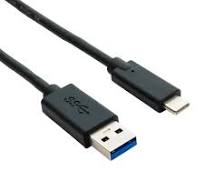
A USB Type-C to USB Type-A cable connects a modern USB-C device to a traditional USB-A port and can support charging, data transfer, or both, depending on the cable construction, USB specification, and connected devices.
USB Type-C to USB Type-A cables remain important for B2B electronics because many computers, chargers, power adapters, hubs, car systems, and legacy accessories still use USB-A ports, while newer smartphones, headphones, power banks, and other devices increasingly use USB-C ports.
For manufacturers and distributors, however, a Type-C to Type-A cable is not simply a cable with two different connectors. The internal conductor structure, USB generation, shielding, connector design, current capability, cable length, and manufacturing quality all affect the final product.
What Is a USB Type-C to USB Type-A Cable?
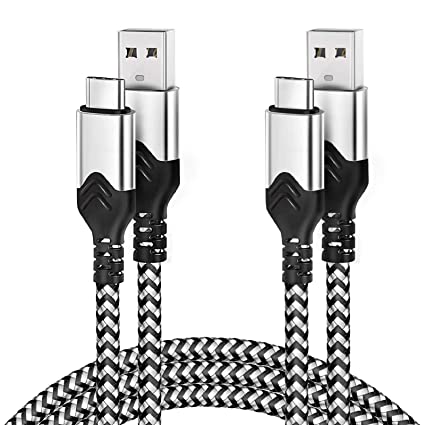
A USB Type-C to USB Type-A cable has a USB Type-C plug on one end and a USB Standard-A plug on the other.
The two connectors serve different purposes:
USB Type-C: newer, smaller, reversible connector
USB Type-A: legacy rectangular USB connector widely used on computers, chargers, hubs, TVs, cars, and other equipment
USB-IF describes USB Type-C as a reversible connector system designed for modern device form factors while maintaining USB functionality and scalable power/performance. (USB)
USB-IF’s current Type-C compliance documentation specifically includes USB Type-C to legacy USB cable assemblies, which confirms that Type-C-to-legacy-USB cables are part of the defined USB ecosystem. (USB)
For B2B buyers, the important point is:
USB Type-C describes one connector. USB Type-A describes the other. Neither name alone defines the cable’s speed or charging capability.
Why Are USB-C to USB-A Cables Still Used?
Why would a customer buy a USB-C to USB-A cable?
The main reason is compatibility.
Many users have modern USB-C devices but still own equipment with USB-A ports.
Common applications include:
Smartphones
Android devices
Wireless headphones
Bluetooth speakers
Power banks
Game controllers
Cameras
GPS devices
Computer peripherals
USB hubs
Desktop computers
Laptops with USB-A ports
Wall chargers
Car chargers
Automotive USB ports
For B2B brands, this creates demand for different product versions rather than a single universal cable.
For example:
USB-C to USB-A 2.0 charging cable
and
USB-C to USB-A 5Gbps data cable
may look similar but require different internal designs.
What Is the Difference Between USB Type-C and USB Type-A?
Is USB-C faster than USB-A?
Not automatically.
The connector type does not determine the complete USB data rate.
A USB-C port can support different USB generations, while USB-A products can also support USB 2.0 or USB 3.x depending on the implementation.
USB-IF’s USB 3.2 documentation includes testing for products using both legacy and USB Type-C connectors. (USB)
Therefore:
USB-C ≠ automatically high speed
and:
USB-A ≠ automatically USB 2.0
The actual performance depends on the host, device, controller, cable, and supported USB specification.
What USB Speeds Can a USB-C to USB-A Cable Support?
This depends on the cable design.
A basic USB-C to USB-A cable may be designed for USB 2.0, while a properly designed cable can support higher USB 3.x data rates where the connected equipment and cable are compatible.
USB-IF identifies USB 2.0 Type-C products as supporting up to 480 Mbps, while USB 3.2 specifications cover higher-speed USB implementations. (USB)
A practical B2B comparison is:
| Cable Specification | Maximum Data Rate | Typical Application | Design Complexity |
|---|---|---|---|
| USB 2.0 Type-C to A | 480 Mbps | Charging + basic synchronization | Low |
| USB 3.2 Gen 1 | 5 Gbps | Phones, storage, peripherals | Medium |
| USB 3.2 Gen 2 | 10 Gbps | High-speed storage/peripherals | Higher |
| USB-C charging-focused | Data may be limited | Chargers, power banks | Low to medium |
| Custom high-current Type-C to A | Depends on implementation | Fast charging | Medium to high |
Do not advertise a Type-C to Type-A cable as “high speed” without specifying the actual data rate.
For a B2B buyer, 480 Mbps, 5 Gbps, or 10 Gbps is much more useful than the phrase “fast data transfer.”
Can a USB Type-C to USB-A Cable Support Fast Charging?
Yes, but the charging capability depends on the complete cable and charging system.
The relevant factors include:
USB-A source capability
USB-C device requirements
Cable conductor resistance
Cable current capability
Connector contact resistance
Cable length
Charger protocol
Device charging protocol
Internal cable construction
A Type-C connector on one end does not automatically mean the cable supports modern USB Power Delivery levels.
This is particularly important for B2B buyers because USB Power Delivery is primarily associated with USB-C power negotiation, while a USB-A source has different electrical and protocol constraints.
A manufacturer should therefore define the intended charging protocol and current requirement before selecting the cable architecture.
How Much Current Can a USB-C to USB-A Cable Carry?
Current capability is determined by the entire cable design rather than the connector name.
Important parameters include:
Conductor AWG
Common cable designs may use conductors such as:
28 AWG
26 AWG
24 AWG
Other application-specific constructions
A smaller AWG number generally indicates a larger conductor diameter.
For higher-current applications, larger conductors can reduce electrical resistance and voltage drop.
Cable Length
A 1-meter cable and a 2-meter cable using otherwise similar construction will not necessarily have the same voltage drop.
Connector Resistance
The contact resistance of the USB-A and USB-C plugs contributes to the overall resistance of the cable assembly.
Temperature Rise
At higher current, resistive losses generate heat.
The basic relationship is:
Power loss = I² × R
This means that increasing current can significantly increase heat generation when resistance remains constant.
For example, doubling current increases resistive heating by approximately four times.
This is one reason high-current cable designs need careful conductor and connector selection.
Does a USB-C to USB-A Cable Need an E-Marker?
Not every USB-C to USB-A cable should be treated the same way as a USB-C-to-USB-C cable.
USB-IF’s compliance updates specifically state that Gen 1 USB Type-C-to-Type-C cables must implement an E-Marker. (USB-IF 合规更新页)
That requirement should not simply be transferred to every Type-C-to-A design.
For a Type-C-to-A cable, the manufacturer should instead determine the required cable architecture based on:
USB specification
Current capability
Type-C requirements
Charging functionality
Data functionality
Target device
Compliance requirements
This is a good example of why B2B buyers should provide a detailed product specification rather than simply requesting an “E-Marker cable.”
Can a USB-C to USB-A Cable Transfer Data?
Yes.
A USB-C to USB-A cable can transfer:
Files
Photos
Videos
Music
Device synchronization data
Peripheral data
But the actual data rate depends on the USB generation supported by both the cable and connected devices.
For example, a cable designed for USB 2.0 can operate at up to 480 Mbps, while a USB 3.2 implementation can support substantially higher data rates. (USB)
If a customer needs high-speed storage performance, a basic charging-oriented Type-C-to-A cable may not be suitable.
Can a USB-C to USB-A Cable Support USB 3.2?
Yes, provided the cable and devices are designed for the required USB 3.2 implementation.
This is where internal cable construction becomes important.
A higher-speed Type-C-to-A cable may require:
Additional high-speed differential pairs
Controlled impedance
Better conductor geometry
Proper shielding
High-quality connectors
Shorter practical cable lengths
Tighter manufacturing tolerances
USB-IF currently maintains dedicated USB 3.2 electrical compliance testing, with the USB 3.2 Electrical Compliance Test Specification Rev. 1.8 dated June 30, 2026. (USB)
Therefore, a manufacturer claiming 5 Gbps or 10 Gbps capability should have an appropriate engineering and testing process behind that claim.
Why Is Shielding Important in a USB-C to USB-A Cable?
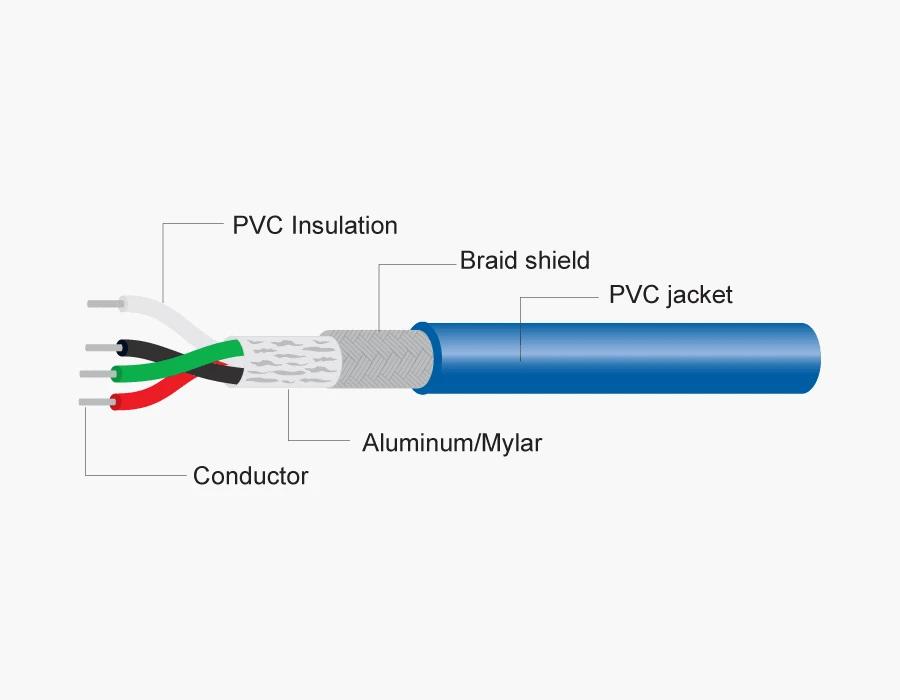
Shielding helps protect high-speed signals from electromagnetic interference and reduces unwanted coupling between signal paths and external noise sources.
Common shielding structures include:
Aluminum Foil Shielding
Aluminum foil provides broad coverage around signal conductors.
It can be used as part of a layered shielding structure.
Braided Shielding
A copper or tinned-copper braid can provide additional shielding and mechanical robustness.
Foil + Braid
For higher-performance cable designs, a combination of foil and braid may be used.
For B2B applications, the important question is not simply:
“Does the cable have shielding?”
Instead, ask:
“What shielding structure is used, and what performance requirement is it designed to meet?”
What Is the Difference Between a USB 2.0 and USB 3.2 Type-C to Type-A Cable?
The external appearance can be very similar.
The internal construction is different.
| Parameter | USB 2.0 Type-C to A | USB 3.2 Type-C to A |
|---|---|---|
| Data rate | Up to 480 Mbps | Up to 5/10 Gbps depending on implementation |
| High-speed pairs | Basic USB 2.0 data architecture | Additional high-speed signal paths |
| Signal integrity requirements | Lower | Much higher |
| Shielding requirements | Application-dependent | More demanding |
| Manufacturing tolerance | Relatively forgiving | More controlled |
| Typical application | Charging/sync | SSDs, high-speed peripherals |
| BOM cost | Lower | Higher |
| Testing complexity | Lower | Higher |
USB-IF explicitly notes that a USB 2.0 Type-C cable physically cannot support USB 3.2 or USB4 signaling because the required high-speed signal contacts are not implemented. (USB)
This is an important specification point for product development.
Does Cable Length Affect USB-C to USB-A Performance?
Yes.
As cable length increases, electrical losses and signal attenuation generally increase.
For charging, longer cable length can increase:
Resistance
Voltage drop
Heat generation
For high-speed data, longer cable length can increase:
Insertion loss
Signal attenuation
Return loss sensitivity
Crosstalk challenges
Timing and signal-integrity challenges
Common commercial lengths include:
0.5 m
1 m
1.2 m
1.5 m
2 m
3 m
A B2B buyer should therefore specify:
data rate + power/current + cable length
rather than specifying length alone.
What Materials Are Used in USB Type-C to USB-A Cables?
What conductor material should a B2B buyer choose?
Common options include:
Bare copper
Tinned copper
Copper alloy components in specific connector structures
For mainstream quality cable production, copper conductors are widely used because electrical resistance is an important performance factor.
A buyer should request the actual conductor specification rather than relying on a generic term such as “premium copper.”
What jacket materials are available?
Common jacket options include:
PVC
Cost-effective
Easy to process
Suitable for general-purpose cables
TPE
Flexible
Soft touch
Suitable for consumer electronics
Nylon Braided
Improved abrasion resistance
Premium appearance
Suitable for retail products
The external material does not determine the cable’s data speed.
A braided cable can still be a USB 2.0 cable.
Callout Box — Expert Quality Inspector
“For a Type-C-to-A cable, I do not approve a sample just because charging works. I check conductor resistance, connector contact quality, continuity, solder joints, shielding, pull strength, bending performance, and the required USB data performance. The specification must match the test result.”
What Connector Quality Should B2B Buyers Check?
Connector quality is one of the most important parts of the cable assembly.
A USB Type-C plug contains multiple contacts in a compact structure, while the USB-A plug uses a different mechanical design.
Important inspection points include:
Contact plating
Contact resistance
Housing material
Connector dimensions
Shell strength
Solder joint quality
Crimping quality
Strain relief
Plug insertion force
Plug extraction force
Mechanical durability
USB-IF’s Type-C compliance documentation includes mechanical, environmental, and electrical performance criteria for Type-C connectors and cable assemblies. (USB)
For OEM projects, connector selection should therefore be part of the engineering specification rather than something selected only based on appearance.
What Should a USB-C to USB-A Cable Manufacturer Test?
A professional cable manufacturer should establish testing at several stages.
What Should Be Tested During Incoming Inspection?
Incoming materials can include:
USB-C connectors
USB-A connectors
Copper wire
Insulation
Shielding materials
Jacket materials
E-Marker components where applicable
Molded parts
The goal is to prevent nonconforming materials from entering production.
What Should Be Tested During Production?
Typical process checks include:
Wire stripping
Terminal crimping
Soldering
Connector assembly
Shielding
Overmolding
Cable length
Continuity
What Should Be Tested on Finished Cables?
Finished-product tests may include:
Continuity
Short circuit
Resistance
Charging/current test
Data transfer test
Connector pull test
Bending test
Plug/unplug durability
Appearance inspection
For higher-speed products, additional signal-integrity testing may be required.
USB-IF’s cable compliance program includes Type-C functional testing, Power Delivery compliance testing where applicable, and signal-integrity testing. (USB)
Does a USB-C to USB-A Cable Need USB-IF Certification?
This depends on the product, market, customer requirement, and intended claim.
USB-IF operates a certification and compliance program covering USB cables and connectors. Its Type-C compliance documentation includes Type-C-to-legacy-USB cable assemblies. (USB)
A B2B buyer should distinguish between:
USB specification compliance
and
USB-IF certification/testing
and
general factory quality testing.
These are not interchangeable terms.
If a customer requires USB-IF certification, the supplier should provide product-specific documentation and certification information rather than simply showing a generic factory certificate.
What About RoHS and REACH Compliance?
For B2B electronics sold into regulated markets, material compliance can be an important sourcing requirement.
Depending on the target market and customer specification, buyers may request:
RoHS compliance
REACH-related documentation
Material declarations
Supplier declarations
Test reports
Restricted-substance test reports
For lead-free manufacturing, buyers may also specify lead-free solder materials such as SAC305.
The exact compliance documentation should be matched to the target market and final product.
How Should a B2B Buyer Specify a USB Type-C to USB-A Cable?
A good RFQ should contain enough technical information for suppliers to quote the same product.
For example:
| Specification | Example Requirement |
|---|---|
| Cable Type | USB Type-C to USB Type-A |
| Data | USB 2.0 / 480 Mbps |
| Charging | Application-specific current requirement |
| Length | 1.0 m |
| Conductor | Copper |
| Power Wire | 24/26/28 AWG according to design |
| Data Wire | Application-specific |
| Shielding | Foil / braid / foil + braid |
| Jacket | PVC / TPE / Nylon |
| USB-C Connector | Custom housing |
| USB-A Connector | Standard-A |
| Color | Black |
| Logo | Customer logo |
| Compliance | RoHS / REACH as required |
| Packaging | Custom retail or bulk |
| MOQ | Customer requirement |
| Testing | Electrical + mechanical + appearance |
The exact AWG, data architecture, current rating, and shielding should be finalized by engineering according to the target application.
What Are the Most Common Buying Mistakes?
Is “Fast Charging Cable” a complete specification?
No.
“Fast charging” is a marketing description, not a complete engineering specification.
The RFQ should specify the required current, power, charging protocol, source device, and target device.
Is a thicker cable always better?
No.
A larger conductor can reduce resistance, but overall cable performance also depends on connector design, insulation, shielding, signal pairs, length, flexibility, and application.
Is a braided cable automatically higher quality?
No.
Braiding mainly affects mechanical protection and appearance.
It does not automatically make a cable USB 3.2 or increase its charging capability.
Does USB-C automatically mean fast data?
No.
USB-IF explicitly distinguishes USB 2.0 Type-C cables from USB 3.2 and USB4 implementations. A USB 2.0 Type-C cable cannot carry USB 3.2 or USB4 signals. (USB)
How Should You Compare USB Type-C to USB Type-A Cable Suppliers?
For a B2B purchasing team, price should be compared together with the actual specification.
Consider:
Product engineering capability
Connector quality
Copper conductor specification
AWG
Shielding construction
Cable length tolerance
Charging/current performance
USB data performance
Mechanical durability
Production QC
Testing equipment
Compliance documentation
OEM/ODM capability
MOQ
Lead time
Packaging capability
A supplier offering a lower price may be quoting a different cable construction.
For this reason, buyers should compare BOM + specification + test requirements, not only the unit price.
What Applications Are Suitable for USB-C to USB-A Cables?
USB-C to USB-A cables are particularly useful where the end device has migrated to USB-C but the power or data source still uses USB-A.
Common applications include:
Smartphones
Charging and basic data synchronization.
Wireless Headphones
Charging cases and headphones frequently use USB-C.
Power Banks
USB-A outputs remain common on many power banks.
Computers
USB-A ports are still found on many desktop PCs and laptops.
Automotive Electronics
USB-A ports remain present in many vehicles and aftermarket systems.
Consumer Accessories
Controllers, cameras, keyboards, mice, speakers, and other peripherals may use USB-C on the device side.
For private-label brands, these applications can support multiple cable SKUs based on length, material, color, charging capability, and data rate.
How Can a USB-C to USB-A Cable Manufacturer Support OEM and ODM Projects?
A professional B2B cable supplier can customize more than the logo.
Typical OEM/ODM options include:
Cable length
Cable color
Jacket material
Braided fabric
Connector shell
Logo
Mold design
Cable thickness
Connector plating
Packaging
Labeling
Barcode
Retail box
Polybag
Instruction card
For larger projects, the manufacturer can also customize the electrical specification.
For example:
USB-C to USB-A + 1 m + 5 Gbps + black TPE + custom logo
is a much more useful product definition than:
“1-meter Type-C cable.”
What Makes a Reliable USB-C to USB-A Cable Supplier?
A reliable B2B supplier should be able to answer specific engineering questions.
Ask:
- What USB data specification does the cable support?
- What is the conductor material?
- What AWG is used?
- What is the cable resistance?
- What current is the cable designed for?
- What shielding structure is used?
- What connector supplier is used?
- What mechanical tests are performed?
- What data-performance tests are performed?
- What RoHS/REACH documentation is available?
- Does the product require USB-IF testing?
- Can the supplier provide a product-specific test report?
USB-IF’s current compliance program emphasizes that USB cables do not all have the same capabilities and that users should select cables according to the requirements of their particular USB environment. (USB)
That is exactly the approach a B2B purchasing team should take.
Conclusion: What Should B2B Buyers Know About USB Type-C to USB-A Cables?
A USB Type-C to USB-A cable is mainly a compatibility solution connecting modern USB-C devices to legacy USB-A ports.
But the connector combination does not tell you the complete product specification.
Before placing an OEM or bulk order, define:
Connector + USB generation + data rate + current requirement + conductor + AWG + shielding + length + jacket + connector quality + compliance + testing.
For a basic charging cable, the design may be relatively simple.
For a 5 Gbps or 10 Gbps data cable, the engineering requirements become more demanding because signal integrity, impedance, shielding, connector quality, and manufacturing consistency become increasingly important.
For B2B buyers, the safest sourcing approach is to provide the supplier with a detailed RFQ and require the supplier to support the claimed specifications with appropriate testing and documentation.
FAQ: USB Type-C to USB-A Cable
1. What is a USB Type-C to USB Type-A cable used for?
A USB Type-C to USB Type-A cable connects a USB-C device to a USB-A port. It can be used for charging, data synchronization, or both, depending on the cable and connected devices.
2. How fast is a USB-C to USB-A cable?
The speed depends on the USB specification. USB 2.0 implementations support up to 480 Mbps, while USB 3.2 implementations can support higher rates such as 5 Gbps or 10 Gbps, provided the cable and devices support the required configuration. (USB)
3. Can a USB-C to USB-A cable support fast charging?
Yes, but the actual charging capability depends on the cable construction, current capability, source, device, and charging protocol. A USB-C connector alone does not guarantee a particular charging power.
4. How should I choose a USB-C to USB-A cable manufacturer?
Specify the required data rate, charging/current requirement, length, conductor, AWG, shielding, jacket, connectors, compliance requirements, testing requirements, MOQ, and OEM customization. Then evaluate suppliers based on engineering capability, quality control, testing, and production consistency.
USB cable.
Picture this: You’re sitting at your desk, engrossed in a project
Where Can I Buy a High-Quality Pd Fast Charging Cable?
FAQ
1 cable
USB-C cables certainly.
Share This Artcle:

Fast delivery
Fastest delivery within 22 days

Quick proofing
Fastest 3-day proofing cycle

After-sale protection
24-month long warranty

1V1Customer Service
Professional customer service follow-up
Lorem ipsum dolor sit amet, consectetur adipiscing elit. Ut elit tellus, luctus nec ullamcorper mattis, pulvinar dapibus leo.