
USB 2.0 vs. USB 3.2 vs. USB4 Cables: Speed and Performance Compared
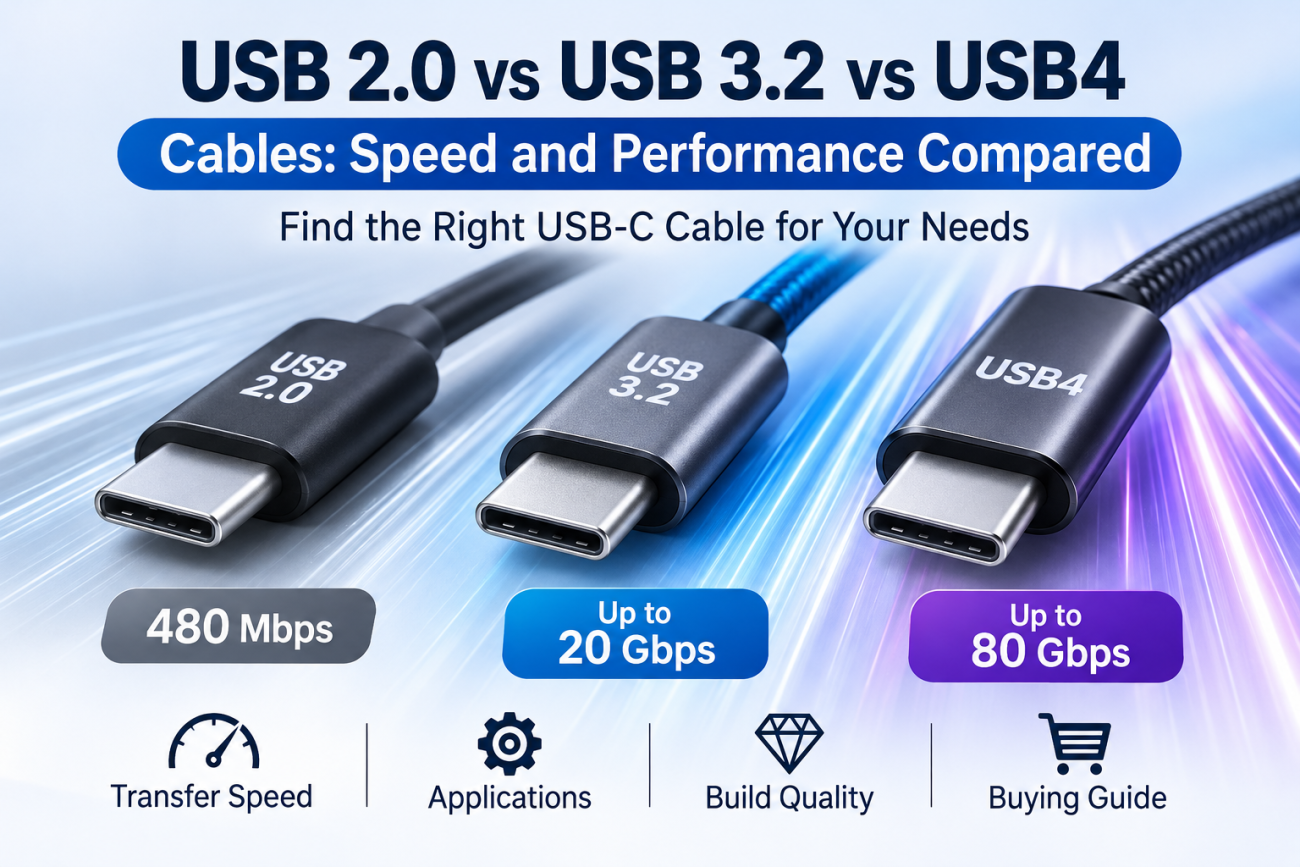
The main difference between USB 2.0, USB 3.2, and USB4 cables is data-transfer speed. USB 2.0 supports up to 480Mbps, USB 3.2 supports 5Gbps, 10Gbps, or 20Gbps, and USB4 supports 20Gbps or 40Gbps, with USB4 Version 2.0 extending performance to 80Gbps. The right cable depends on the connected devices, data requirements, and budget.
For importers and wholesalers, understanding these differences is important when selecting USB-C cables for smartphones, external SSDs, laptops, docking stations, and other electronic accessories.
1. USB 2.0 vs. USB 3.2 vs. USB4: What Are the Main Differences?
The three standards offer different levels of data-transfer performance.
USB Cable Speed Comparison
| Feature | USB 2.0 | USB 3.2 | USB4 |
|---|---|---|---|
| Maximum signaling speed | 480Mbps | Up to 20Gbps | Up to 80Gbps with USB4 Version 2.0 |
| Common speed levels | 480Mbps | 5Gbps, 10Gbps, 20Gbps | 20Gbps, 40Gbps, 80Gbps |
| Connector options | USB-A, USB-B, USB-C, and others | USB-A and USB-C, depending on implementation | USB-C |
| Typical applications | Basic charging and data transfer | External storage, cameras, and faster peripherals | High-speed storage, docks, and advanced displays |
| Cable construction | Simpler data-path requirements | Additional high-speed signal paths | More demanding high-speed signal design |
| Relative cost | Generally lower | Medium to high | Generally higher |
| Best for | Everyday accessories | Faster data-transfer products | Premium high-performance applications |
Important: These are maximum signaling rates, not guaranteed real-world file-transfer speeds. Actual performance depends on the host device, connected device, cable, protocol overhead, and other system limitations.
2. What Is a USB 2.0 Cable?
USB 2.0 is a widely used interface standard that supports a maximum signaling rate of 480Mbps, equivalent to 60MB/s before protocol overhead.
It remains common in charging cables and everyday electronic accessories because many applications do not require high-speed data transfer.
Main Features of USB 2.0 Cables
Maximum data signaling rate of 480Mbps.
Available in USB-A to USB-C and USB-C to USB-C configurations, among others.
Suitable for basic data synchronization and peripheral connections.
Commonly used in smartphone charging cables.
Generally simpler and more economical to manufacture than high-speed cables.
What Devices Use USB 2.0 Cables?
Typical applications include:
Smartphone charging cables.
Basic tablet charging cables.
Power banks.
Bluetooth accessories.
Keyboards and computer mice.
Basic data synchronization.
Other accessories that do not require high-speed data transfer.
Is USB 2.0 Enough for Charging?
Yes. USB 2.0 describes data-transfer capability, not the maximum charging power of a cable.
A USB 2.0 cable can support USB Power Delivery charging when it is correctly designed and specified for the required power level.
For example, a USB-C to USB-C cable may support USB 2.0 data transfer while also supporting 60W charging.
This means buyers should evaluate charging power and data-transfer speed as two separate product specifications.
When Should Wholesalers Choose USB 2.0?
USB 2.0 is a practical choice for buyers targeting:
General smartphone accessory markets.
Entry-level charging cable collections.
Budget-friendly retail products.
Everyday charging and synchronization applications.
Large-volume orders where high-speed data transfer is not required.
For many charging-focused products, USB 2.0 provides a reasonable balance between functionality and manufacturing cost.
3. What Is a USB 3.2 Cable?
USB 3.2 is designed for faster data transfer than USB 2.0. It includes three main signaling rates: 5Gbps, 10Gbps, and 20Gbps.
These speeds are commonly associated with different USB 3.2 configurations.
USB 3.2 Speed Levels
| USB 3.2 Configuration | Maximum Signaling Speed | Common Consumer-Facing Speed Description |
|---|---|---|
| USB 3.2 Gen 1 | 5Gbps | USB 5Gbps |
| USB 3.2 Gen 2 | 10Gbps | USB 10Gbps |
| USB 3.2 Gen 2×2 | 20Gbps | USB 20Gbps |
USB 3.2 Gen 2×2 uses two 10Gbps lanes to reach a combined signaling rate of 20Gbps.
Main Features of USB 3.2 Cables
Faster data transfer than USB 2.0.
Suitable for external storage and high-speed peripherals.
Can support different power ratings depending on cable construction.
Requires appropriate high-speed signal paths and cable design.
USB-C is commonly used for high-performance USB 3.2 cable applications.
What Devices Use USB 3.2 Cables?
Typical applications include:
External SSDs.
High-speed USB flash drives.
Digital cameras.
Video capture devices.
High-performance USB peripherals.
Compatible docking stations.
Devices that transfer large files frequently.
Is USB 3.2 Worth the Extra Cost?
For buyers targeting professional users or customers who regularly transfer large files, USB 3.2 can provide a meaningful performance improvement.
For basic smartphone charging, however, the higher data-transfer capability may offer little practical value.
B2B purchasing tip: Before ordering USB 3.2 cables, confirm the exact speed level. A cable advertised simply as “USB 3.2” does not tell the buyer whether it supports 5Gbps, 10Gbps, or 20Gbps.
4. What Is a USB4 Cable?
USB4 is a high-performance USB architecture designed for faster data transfer and more advanced connectivity.
It uses the USB-C connector and supports multiple protocols, allowing data, display, and other traffic to share available bandwidth.
USB4 Version 1.0 supports up to 40Gbps. USB4 Version 2.0 extends the architecture to 80Gbps, with an optional asymmetric mode that can provide up to 120Gbps in one direction and 40Gbps in the other for supported display applications.
Main Features of USB4 Cables
Supports high-speed data transfer.
Uses USB-C connectors.
Supports advanced data and display applications.
Can support high-performance docking and external storage.
Offers backward compatibility with earlier USB technologies.
Requires cable and device capabilities that match the intended USB4 performance level.
What Devices Use USB4 Cables?
Typical applications include:
High-performance laptops.
External NVMe SSD enclosures.
Advanced docking stations.
Professional display systems.
High-speed data storage devices.
Compatible Thunderbolt 3 devices and peripherals.
Compatibility depends on the specific host, device, cable, and protocol implementation. Do not assume that every USB4 cable supports every display or Thunderbolt feature.
Is USB4 Better Than USB 3.2?
For high-bandwidth applications, USB4 can provide significantly greater performance.
However, USB4 is not automatically the best choice for every customer.
For basic charging cables and everyday smartphone accessories, USB4 may add cost without providing a meaningful benefit.
For premium laptop accessories, external storage, and advanced docking applications, USB4 may be more suitable.
5. Why Does USB-C Not Always Mean High-Speed Data Transfer?
One of the most common misunderstandings in the USB cable market is that every USB-C cable supports high-speed data transfer.
This is incorrect.
USB-C describes the connector and cable interface, not a guaranteed data-transfer speed.
A USB-C cable may support:
USB 2.0 at 480Mbps.
USB 3.2 at 5Gbps, 10Gbps, or 20Gbps.
USB4 at supported 20Gbps, 40Gbps, or 80Gbps levels.
Two cables can have identical USB-C connectors but very different internal constructions and performance capabilities.
Why Do USB-C Cables Have Different Speeds?
The differences are related to several technical factors:
1. Internal conductor and signal-path design
High-speed cables require suitable conductors and signal paths to support higher-frequency data transmission.
2. Shielding and signal integrity
Appropriate shielding and cable construction help control electromagnetic interference and signal degradation.
3. Connector design
The connector assembly must support the required signal contacts and electrical performance.
4. Cable length
Longer cables can create additional signal-loss challenges. High-speed cable designs may require different construction or active electronics to achieve their rated performance.
5. Host and device compatibility
Even if a cable supports USB4, the connected host and device must also support the relevant USB4 capability.
A USB 2.0 Type-C cable is physically limited to USB 2.0 functionality and cannot carry USB 3.2 or USB4 signals. Connecting it to a USB4 computer does not make it a USB4 cable.
6. USB 2.0 vs. USB 3.2 vs. USB4: Which Cable Is Faster in Real Use?
Higher signaling speed can reduce transfer time, especially when moving large files.
However, actual transfer speeds are usually lower than the theoretical maximum because of protocol overhead, storage performance, host limitations, and other factors.
Example: Transferring a 10GB File
The following table shows simplified theoretical transfer times based on maximum signaling rates. It is not a prediction of actual file-transfer performance.
| Cable Standard | Maximum Signaling Rate | Theoretical Time for 10GB |
|---|---|---|
| USB 2.0 | 480Mbps | About 167 seconds |
| USB 3.2 Gen 1 | 5Gbps | About 16 seconds |
| USB 3.2 Gen 2 | 10Gbps | About 8 seconds |
| USB 3.2 Gen 2×2 | 20Gbps | About 4 seconds |
| USB4 40Gbps | 40Gbps | About 2 seconds |
| USB4 80Gbps | 80Gbps | About 1 second |
These estimates assume decimal gigabytes and ideal signaling-rate conversion. They exclude protocol overhead and storage limitations.
In real-world use, an external SSD may be unable to reach the cable’s maximum signaling rate. A faster cable cannot make a slow storage device transfer data faster than the device itself allows.
7. What Is the Difference Between USB Cable Data Speed and Charging Power?
Data-transfer speed and charging power are two different specifications.
A cable can support high charging power but only USB 2.0 data transfer. Another cable can support USB4 data transfer but have a different power rating.
Data Speed vs. Charging Power
| Product Type | Data Capability | Charging Capability |
|---|---|---|
| Basic USB-C cable | USB 2.0 | Depends on its power rating |
| USB-C 60W cable | May support USB 2.0 | Up to 60W, if correctly designed |
| USB-C 100W cable | May support USB 2.0 or higher | Traditional 100W capability |
| USB-C 240W cable | May support USB 2.0 or higher | Up to 240W with EPR support |
| High-speed USB4 cable | USB4 performance as specified | Depends on its power rating and design |
For example, a 240W USB-C cable does not automatically support USB4 data transfer. It may support only USB 2.0 data while providing high-power charging.
Likewise, a high-speed USB4 cable should not be assumed to support 240W charging unless its power capability is specifically rated for it.
For B2B buyers, both specifications should be confirmed separately on the product datasheet.
8. How Should Importers and Wholesalers Choose the Right USB Cable?
The best cable depends on the target market, product positioning, and customer requirements.
Choose USB 2.0 for Everyday Charging Accessories
USB 2.0 is suitable for:
Smartphone charging cables.
Tablet charging accessories.
Power bank cables.
Entry-level retail products.
Budget-focused wholesale markets.
It is often the most practical option when customers mainly need charging and basic data synchronization.
Choose USB 3.2 for Faster Data Transfer
USB 3.2 is suitable for:
External SSD accessories.
Camera and computer accessories.
High-speed USB peripherals.
Professional data-transfer products.
Mid-range and premium cable collections.
Buyers should clearly identify whether the product supports 5Gbps, 10Gbps, or 20Gbps.
Choose USB4 for Premium Performance Markets
USB4 is suitable for:
Premium laptop accessories.
High-speed external storage.
Advanced docking stations.
Professional computing accessories.
High-performance connectivity products.
For these applications, supplier engineering capability and product testing become especially important.
B2B Product Selection Guide
| Target Customer | Recommended Standard | Main Reason |
|---|---|---|
| Smartphone accessory wholesalers | USB 2.0 | Cost-effective for basic charging |
| General electronics retailers | USB 2.0 or USB 3.2 | Depends on customer needs |
| Computer accessory distributors | USB 3.2 | Better data-transfer performance |
| External SSD accessory brands | USB 3.2 or USB4 | Supports faster storage connections |
| Premium laptop accessory brands | USB4 | Advanced connectivity and bandwidth |
| Professional docking accessory suppliers | USB4 | Suitable for high-performance applications |
9. What Should Buyers Check Before Bulk Purchasing High-Speed USB Cables?
High-speed cables require more careful inspection than basic charging cables.
A cable may look identical to another product but have significantly different electrical performance.
Before placing a bulk order, buyers should check the following:
1. Confirm the Exact Data-Transfer Rating
Do not accept descriptions such as “high-speed USB-C cable” without a specific supported speed.
Ask the manufacturer to confirm whether the cable supports USB 2.0, USB 5Gbps, USB 10Gbps, USB 20Gbps, USB 40Gbps, or USB 80Gbps, as applicable.
2. Check Cable Construction
Ask about:
Conductor materials and wire specifications.
High-speed signal-path construction.
Shielding design.
Connector components.
Cable length.
Passive or active cable design, where relevant.
3. Verify Data-Transfer Performance
Use appropriate host devices, test equipment, and compatible peripherals to verify the advertised performance.
For high-speed products, testing should follow the applicable USB specification and compliance requirements.
4. Check Signal Integrity
High-speed USB cables require appropriate signal-integrity performance.
Depending on the product, testing may include insertion loss, return loss, crosstalk, and other relevant electrical measurements.
5. Inspect Mechanical Durability
Check connector retention, cable bending, pull strength, and strain relief.
A high-speed cable must be mechanically reliable as well as electrically compliant.
6. Review Compliance and Test Documents
Ask the supplier for applicable USB-IF compliance or certification evidence when the product is marketed as certified.
Verify that the documentation matches the exact cable model and performance rating being purchased.
7. Approve a Production-Equivalent Sample
Before mass production, confirm that the sample uses the same materials, connectors, construction, and manufacturing process as the final order.
A prototype alone is not enough to guarantee that every production batch will meet the agreed requirements.
10. Frequently Asked Questions
Is USB 3.2 faster than USB 2.0?
Yes. USB 2.0 supports up to 480Mbps, while USB 3.2 supports 5Gbps, 10Gbps, or 20Gbps depending on its configuration. USB 3.2 is therefore significantly faster for compatible data-transfer applications.
Is USB4 always faster than USB 3.2?
USB4 supports higher maximum signaling rates, reaching 40Gbps in USB4 Version 1.0 and 80Gbps in USB4 Version 2.0. However, actual performance depends on the specific cable, host, and device. A USB4 connection does not automatically operate at its highest possible speed.
Can a USB 2.0 cable support fast charging?
Yes. USB 2.0 refers to data-transfer capability, not charging power. A properly designed USB-C cable can support high-power charging while retaining USB 2.0 data performance.
Can I use a USB4 cable with a USB 2.0 device?
Yes, USB4 is backward compatible with earlier USB technologies. The connection will operate at the highest speed supported by all connected components, which may be USB 2.0 in this case.
Conclusion
USB 2.0, USB 3.2, and USB4 cables serve different data-transfer requirements.
USB 2.0 is suitable for basic charging and everyday data synchronization. USB 3.2 offers faster performance for external storage and computer accessories. USB4 is designed for advanced applications that require higher bandwidth, such as high-speed storage, docking stations, and professional computing equipment.
For importers and wholesalers, the best approach is to select cables based on the target customer’s actual needs rather than choosing the highest speed automatically.
Before bulk purchasing, confirm the exact data-transfer rating, charging power, cable construction, connector quality, and relevant test evidence. Clear specifications help prevent misleading product claims and reduce customer complaints.
USB cable.
Picture this: You’re sitting at your desk, engrossed in a project
Where Can I Buy a High-Quality Pd Fast Charging Cable?
FAQ
1 cable
USB-C cables certainly.
Share This Artcle:


Fast delivery
Fastest delivery within 22 days

Quick proofing
Fastest 3-day proofing cycle

After-sale protection
24-month long warranty

1V1Customer Service
Professional customer service follow-up
Lorem ipsum dolor sit amet, consectetur adipiscing elit. Ut elit tellus, luctus nec ullamcorper mattis, pulvinar dapibus leo.