
Something You Need to Know About USB-C to USB-C Cable- Apphone
If you use a smartphone, tablet, laptop, or power bank, you probably use a USB-C cable every single day.
But have you ever wondered:
How long does a USB-C cable last?
Some cables last only a few months.
Others can last several years.
So what’s the real difference?
The truth is: a USB-C cable doesn’t have a fixed lifespan. It depends heavily on how it is made and how you use it.
In this guide, we’ll explain the real lifespan of a USB-C charging cable, what affects durability, why cables fail, and how you can make yours last much longer.
What Is the Average Lifespan of a USB-C Cable?
In general, a good-quality USB-C cable lasts:
1 to 5 years
However, this range can vary a lot.
Here’s a simple breakdown:
Cheap USB-C cables: 3–12 months
Mid-range cables: 1–2 years
High-quality USB-C cables: 3–5+ years
So the real answer depends on build quality + usage habits.
Why Do USB-C Cables Wear Out Over Time?
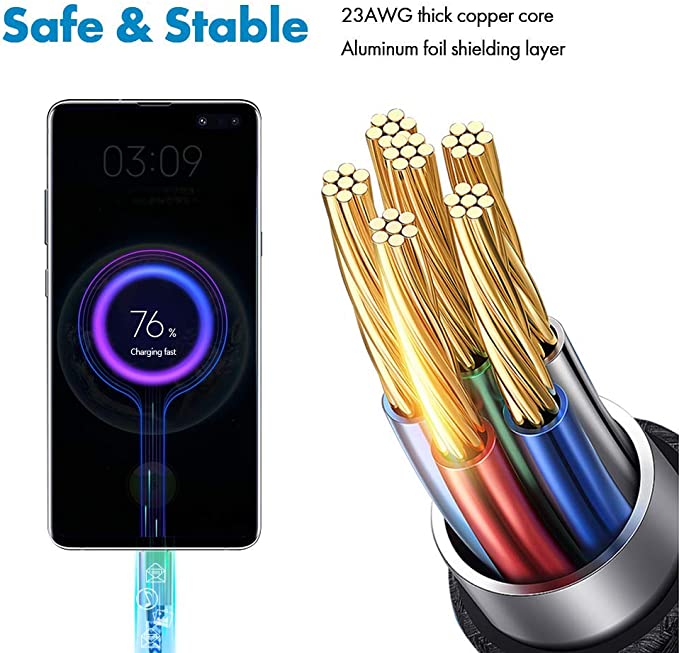
Even though a USB-C cable looks simple, inside it is a complex structure made of:
Power wires (VCC / GND conductors)
Data wires (D+/D- signal lines)
Shielding layers (EMI protection)
Connector pins (gold-plated contacts)
Every time you plug or unplug the cable, bend it, or pull it, these internal parts experience stress.
Over time, this leads to failure.
1. Repeated Bending Is the #1 Killer
The most common reason cables die early is:
Repeated bending near the connector
Most damage happens in the first 2–5 cm of the cable.
Why?
Because that’s where the cable bends the most during daily use.
Inside, tiny copper wires start to:
Fatigue
Break slowly
Lose conductivity
This leads to:
Intermittent charging
Slow charging
Sudden disconnects
2. Pulling the Cable Instead of the Connector
Many people unplug cables like this:
Pulling the wire
Pulling the connector head
When you pull the cable itself, you stress the internal solder joints and copper strands.
Over time this causes:
Internal wire breakage
Even if the cable looks fine outside, it may already be damaged inside.
3. Poor Quality Internal Materials
Not all USB-C cables are built the same.
Low-quality cables often use:
Thin copper wires
Low-grade metal alloys
Weak insulation materials
Poor shielding layers
High-quality cables use:
Thick copper conductors
Tinned copper or high-purity copper
Strong shielding (foil + braided layer)
Reinforced connectors
This is why two cables can look identical but have completely different lifespans.
4. Connector Wear and Tear
Every USB-C cable has:
Connector Pins
These pins touch your device every time you plug in.
Over time, they wear out due to:
Friction
Oxidation
Dust contamination
High-quality cables use:
Gold-plated connector pins
because gold resists corrosion and maintains stable contact longer.
Low-quality pins degrade faster, causing unstable charging.
5. Heat Damage Shortens Lifespan
Heat is another major factor.
USB-C cables generate heat during:
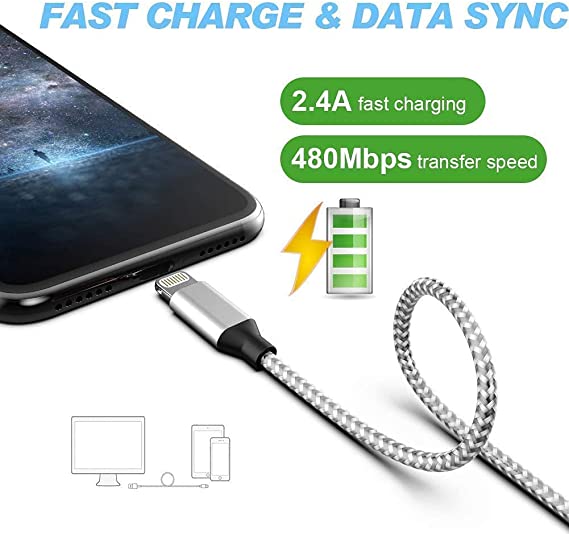
Fast charging
High-power laptop charging
Heavy data transfer
Excessive heat can damage:
Internal insulation
Copper conductors
Connector joints
This is why cables used for 100W–240W charging are usually thicker and more durable.
6. Environmental Damage (Often Ignored)
USB-C cables also degrade due to environment:
High humidity → corrosion
Direct sunlight → insulation damage
Dusty environments → connector contamination
Tight storage → internal stress
Even if you don’t use the cable heavily, bad environment can shorten its lifespan.
7. Fast Charging Stress (PD / QC / PPS)
Modern charging standards like:
USB Power Delivery (PD)
Quick Charge (QC)
PPS Fast Charging
require higher voltage and current.
This increases stress on:
Power wires
Connector pins
Shielding layers
Over time, fast charging accelerates cable aging compared to normal 5W charging.
Signs Your USB-C Cable Is Nearing the End
Here are clear warning signs:
Charging keeps disconnecting
Cable only works at certain angles
Charging speed becomes slower
Connector feels loose
Cable gets hot quickly
Data transfer becomes unstable
If you see multiple symptoms, the cable is likely near failure.
How to Make a USB-C Cable Last Longer
You can significantly extend lifespan with simple habits:
Always unplug by the connector
Never pull the wire.
Avoid sharp bending
Especially near the connector head.
Keep cables loosely coiled
Tight wrapping damages internal wires.
Keep connectors clean
Dust causes poor contact and overheating.
Avoid extreme heat
Don’t leave cables in cars or under pillows while charging.
Use certified cables
Look for:
USB-IF certification
PD certification
Thick copper construction
Reinforced shielding
So, How Long Does a USB-C Cable Really Last?
To summarize:
USB-C cable lifespan depends on quality + usage
Light use + premium cable → 3–5+ years
Normal use → 1–3 years
Heavy bending or cheap cable → less than 1 year
So the difference is not just the cable—it’s how it’s used.
Conclusion
If you are asking:
How long does a USB-C cable last?
The honest answer is:
It depends on build quality, internal materials, and daily usage habits.
A well-made USB-C charging cable with strong copper conductors, reinforced shielding, and gold-plated connector pins can last years.
But a cheap cable with weak materials may fail within months.
If you want long-term stability, focus on:
Strong internal wire structure
Good shielding
Durable connector pins
Proper usage habits
Because in the end, a USB-C cable is not just an accessory—it’s a daily power lifeline for your devices.
USB cable.
Picture this: You’re sitting at your desk, engrossed in a project
Where Can I Buy a High-Quality Pd Fast Charging Cable?
1 cable
USB-C cables certainly.
Share This Artcle:

Fast delivery
Fastest delivery within 22 days

Quick proofing
Fastest 3-day proofing cycle

After-sale protection
24-month long warranty

1V1Customer Service
Professional customer service follow-up
Lorem ipsum dolor sit amet, consectetur adipiscing elit. Ut elit tellus, luctus nec ullamcorper mattis, pulvinar dapibus leo.