
Why Do USB-C Cable Connectors Become Loose? Causes and Quality Checks
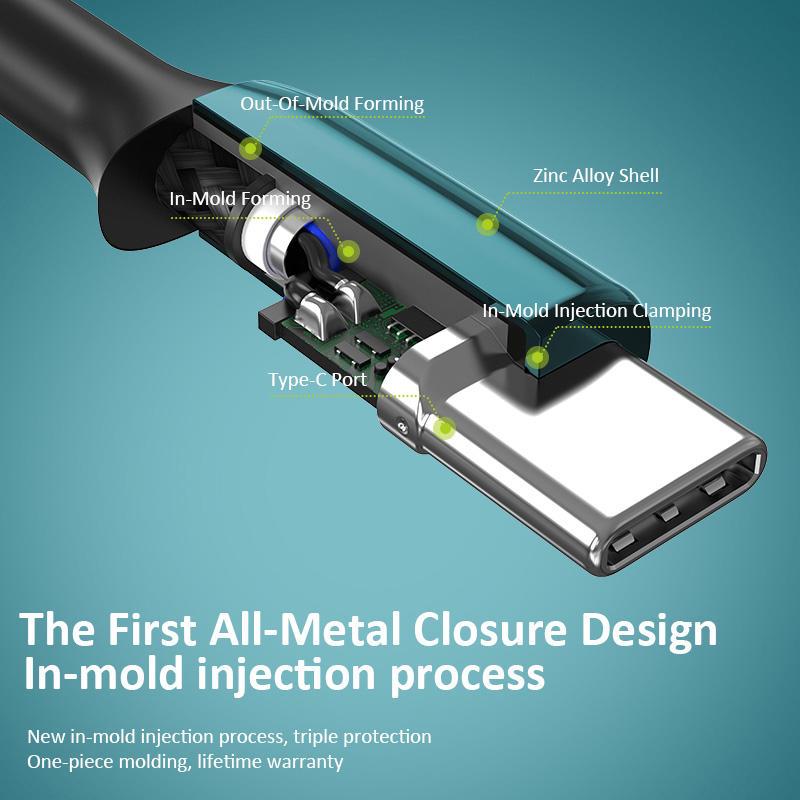
USB-C cable connectors become loose because of worn retention features, poor connector manufacturing, damaged device ports, repeated insertion and removal, or mechanical stress on the cable. For bulk buyers, insertion and extraction force testing, durability testing, and compatibility checks help identify unreliable products before shipment.
Why Is a Loose USB-C Connector a Problem?
A USB-C connector should fit securely into the device’s port without excessive movement or frequent disconnection. If the connection becomes loose, users may experience:
Intermittent charging: The device charges only when the cable is held at a certain angle.
Slow or interrupted data transfer: The connection disconnects during file transfers or other data operations.
Unexpected disconnections: Slight movement of the cable interrupts charging or connectivity.
Increased customer complaints: Loose connectors can lead to product returns, warranty claims, and negative reviews.
For wholesalers, importers, and private-label brands, connector retention is an important quality factor. A cable may look attractive and charge correctly when new but still fail after repeated use.
1. What Causes USB-C Cable Connectors to Become Loose?
1.1 Poor Connector Manufacturing
Manufacturing quality is one of the first things to investigate when multiple cables from the same batch have loose connectors.
USB-C plugs and device receptacles rely on precisely designed mechanical features to maintain a secure connection. Dimensional inconsistencies, poor material control, or inadequate process control can affect how securely the plug fits.
Potential problems include:
Connector dimensions outside the specified tolerances.
Poorly formed or damaged retention features.
Inconsistent metal-shell dimensions.
Weak mechanical construction inside the connector.
Excessive variation between production batches.
What buyers should check: Ask the manufacturer how connector dimensions are controlled, whether incoming connector components are inspected, and whether finished cables undergo insertion and extraction testing.
1.2 Worn Retention Features After Repeated Use
USB-C connectors are designed for repeated insertion and removal, but their mechanical performance can change with use.
The plug’s side-latch features interact with the receptacle’s corresponding retention features. Repeated mating, wear, contamination, and mechanical damage can reduce the connection’s holding force.
A cable that fits securely when new may become easier to pull out after extended use.
What buyers should check: Test representative samples before and after repeated insertion and extraction cycles. Measure the change in extraction force rather than checking only whether the connector still works.
1.3 Low-Quality Materials or Inconsistent Components
Connector performance depends on more than the appearance of the outer metal shell. The materials, dimensions, and manufacturing consistency of the plug and its internal components also matter.
Poorly controlled components may lead to premature wear, deformation, or inconsistent retention performance.
However, a loose connection does not automatically mean the manufacturer used inferior materials. The device’s receptacle, connector wear, contamination, and dimensional compatibility should also be investigated.
What buyers should check: Request component specifications, incoming inspection records, and evidence of mechanical testing. If the connector design or material changes, ask whether the relevant qualification tests need to be repeated.
1.4 Excessive Pulling, Bending, or Sideways Pressure
Users often pull a cable out by its wire instead of gripping the connector housing. They may also bend the cable sharply near the plug or use a connected device while the cable is under tension.
These habits can damage the connector assembly, deform components, or place stress on the device’s charging port.
A poorly designed strain-relief section can make the problem worse by allowing excessive bending close to the connector.
What buyers should check: Evaluate cable flexing, strain relief, and pull strength. Inspect the plug housing and cable exit area for cracks, looseness, deformation, or separation.
1.5 Dust, Lint, or Debris Inside the Device Port
Sometimes the cable is not defective at all.
Pocket lint, dust, and other debris can accumulate inside a phone, tablet, or laptop’s USB-C receptacle. This can prevent the plug from seating fully, making the connection feel loose or unstable.
A damaged or worn device port can produce similar symptoms.
What buyers should check: Test the cable with multiple known-good devices and compare it with a cable that is already known to fit securely. Inspect the port and clean it only using an appropriate, device-safe method. Do not force the connector into the port.
1.6 Poor Compatibility Between the Plug and Receptacle
USB-C is a standardized connector system, but a cable’s real-world fit still depends on the condition and manufacturing quality of both mating components.
A cable may fit poorly in one device but work normally in another. This can point to a damaged receptacle, component variation, or a compatibility issue rather than a universal cable defect.
What buyers should check: Use multiple representative USB-C receptacles or test fixtures. Avoid approving a production batch based on a single phone or laptop.
1.7 Weak Connector Housing or Overmolding
The outer housing and overmold help protect the connector assembly and provide a stable area for users to grip.
If the housing cracks, separates, or moves relative to the connector, the assembly may feel unstable even if the metal plug initially fits the port correctly.
Overmolding alone does not guarantee a durable connector. Its design, adhesion, material, and integration with the underlying assembly all matter.
What buyers should check: Inspect the connector housing, overmold, cable exit, and strain-relief area after mechanical testing. Confirm that repeated handling does not cause separation or movement.
2. How Can Buyers Test USB-C Connector Retention Quality?
The most useful checks combine a simple fit assessment with repeatable mechanical tests and electrical verification.
Test 1: Insertion and Extraction Force
Insertion force measures how much force is required to connect the plug. Extraction force measures how much force is needed to remove it.
These measurements help identify connectors that fit too loosely or require excessive force to connect or disconnect.
A practical inspection process is to:
- Select representative samples from the production batch.
- Use a suitable test fixture and a defined insertion/extraction method.
- Record the initial insertion and extraction forces.
- Repeat the measurements after the specified number of mating cycles.
- Compare the results with the applicable specification and agreed acceptance criteria.
Do not rely only on a person’s impression that a connector feels tight. A repeatable force measurement is more useful for supplier evaluation.
Test 2: Insertion and Extraction Durability
Repeated mating tests help reveal whether a connector’s retention performance deteriorates over time.
The test should define the number of cycles, test speed, fixture, inspection intervals, and pass/fail requirements. After testing, inspect the plug for deformation and check whether its retention performance has changed.
The USB Implementers Forum (USB-IF) publishes connector and cable assembly compliance requirements, including mechanical testing. Buyers should use the specification and revision applicable to the product rather than assuming one test target applies to every USB-C cable.
Official reference: USB-IF USB Type-C Connectors and Cable Assemblies Compliance Document.
Test 3: Cable Pull and Strain-Relief Testing
A cable may have a secure plug fit but still fail because the wire assembly separates from the connector.
A pull test applies a controlled axial load to the cable assembly. Strain-relief testing evaluates how well the cable exit area withstands repeated bending or mechanical stress.
Inspect for:
Cable movement inside the connector housing.
Cracks or separation around the overmold.
Exposed conductors or insulation damage.
Electrical discontinuity after testing.
The test force, duration, and acceptance criteria should be defined in the product specification or agreed quality plan.
Test 4: Flexing and Side-Load Assessment
Flex the cable according to a controlled test procedure, paying particular attention to the area immediately behind the connector.
Check whether bending causes intermittent charging, data interruption, housing damage, or movement of the connector assembly.
Side-loading tests should use a defined fixture and load. Avoid uncontrolled bending or forcing the cable sideways by hand, as this produces inconsistent results and can damage the test fixture or sample.
Test 5: Electrical Continuity and Charging Performance
A connector may appear mechanically secure but still have an electrical problem.
After mechanical testing, verify continuity and check charging performance using suitable equipment. For USB-C to USB-C cables, also verify the advertised power capability and any applicable USB Power Delivery requirements.
If the product supports data transfer, test its advertised data performance as well.
Important: A successful charging test alone does not prove that a connector meets mechanical durability requirements. Mechanical fit, electrical performance, and data performance should be evaluated separately.
3. USB-C Connector Quality Check Table for Bulk Purchasing
The following table can be used as a starting point for a supplier quality checklist. Final acceptance criteria should be agreed before production and matched to the product’s applicable specification.
| Quality check | What to inspect or measure | What may indicate a problem |
|---|---|---|
| Visual inspection | Plug shell, housing, overmold, and cable exit | Deformation, cracks, gaps, or loose parts |
| Insertion force | Force needed to connect the plug | Excessive or inconsistent insertion force |
| Extraction force | Force needed to remove the plug | Abnormally low retention or excessive removal force |
| Mating durability | Force and condition before and after cycling | Retention loss, damage, or inconsistent results |
| Cable pull test | Mechanical integrity under a defined axial load | Cable movement, separation, or damage |
| Flexing test | Cable and connector behavior during controlled bending | Cracks, intermittent connection, or discontinuity |
| Electrical test | Continuity and charging performance | Power interruption or electrical failure |
| Data test | Advertised data-transfer capability, where applicable | Disconnection or failure to meet specified performance |
| Batch consistency | Compare samples from different cartons or production lots | Large variations in fit or measured results |
4. What Should a USB-C Cable Manufacturer Control During Production?
For manufacturers, preventing loose connectors requires quality control at several stages, not just a final visual inspection.
Incoming Component Inspection
Inspect connector components against approved drawings and specifications. Control critical dimensions and investigate unusual variation between incoming lots.
Assembly Process Control
Maintain consistent assembly procedures, tooling, and process parameters. Changes to connector components, materials, dimensions, or fabrication processes may require additional qualification testing.
Finished Product Testing
Define which tests apply to each cable model. Depending on the product, these may include connector force measurements, insertion/extraction durability, cable pull testing, flexing, continuity, and functional performance.
Production Batch Inspection
Use a documented sampling plan to verify that the finished batch matches the approved sample. Record the batch number, test method, equipment, results, and corrective actions for failed samples.
An approved sample should be representative of the actual production design, not a specially prepared sample that differs from the goods being shipped.
QC Inspector’s Note: “A connector that feels tight during a quick manual check is not necessarily durable. We need to measure its retention performance, repeat the test after mechanical cycling, and verify electrical function before approving the product for bulk shipment.”
5. How Can Importers Reduce the Risk of Loose USB-C Connectors?
Before placing a large order, buyers should agree on a clear quality plan with the supplier.
Confirm the connector specification: Identify the exact cable model, connector design, and advertised power and data capabilities.
Request mechanical test records: Ask for insertion/extraction force measurements and relevant durability results.
Approve a production-equivalent sample: Confirm that the sample uses the same components and manufacturing process as the intended order.
Define acceptance criteria in writing: Agree on test methods, sample sizes, allowable defects, and corrective actions before production.
Inspect the actual production batch: Do not rely solely on a prototype or a supplier’s general statement that products are tested.
Track recurring complaints: If customers report loose connectors, record the affected model, production lot, device type, and failure symptoms.
A supplier that can explain its testing methods and provide traceable records is easier to evaluate than one that relies only on product photos or verbal quality claims.
6. Frequently Asked Questions
Why does my USB-C cable keep falling out?
Possible causes include worn plug retention features, a damaged or dirty device port, poor connector manufacturing, or mechanical damage. Test the cable with another known-good device and compare it with a cable that fits securely to help isolate the cause.
Can a loose USB-C connector affect charging speed?
Yes, if the connection becomes intermittent or the electrical contacts are damaged or contaminated. However, a loose physical fit does not automatically mean the cable supports a lower charging speed. Charging performance also depends on the cable’s electrical design, charger, and device.
How do you test whether a USB-C connector is too loose?
Use a suitable fixture to measure insertion and extraction force, then repeat the measurements after the specified mating cycles. Compare the results with the applicable specification and the agreed acceptance criteria. A manual fit check is useful for screening but is not a substitute for controlled measurement.
What should I ask a USB-C cable supplier before bulk purchasing?
Ask about connector component inspection, insertion/extraction force testing, mating durability, pull and flex testing, electrical verification, batch inspection, and traceability. Request the actual test criteria and results for the cable model you intend to purchase.
Conclusion
Loose USB-C cable connectors can result from manufacturing variation, wear, mechanical stress, contamination, or a damaged device port. For B2B buyers, the most reliable approach is to combine controlled insertion/extraction force testing, durability checks, mechanical inspection, and electrical verification.
Before placing a bulk order, agree on the applicable specifications and acceptance criteria, approve a production-equivalent sample, and verify that the delivered batch meets the same requirements. This helps reduce connector-related complaints and protects your brand’s product quality.
USB cable.
Picture this: You’re sitting at your desk, engrossed in a project
Where Can I Buy a High-Quality Pd Fast Charging Cable?
FAQ
1 cable
USB-C cables certainly.
Share This Artcle:



Fast delivery
Fastest delivery within 22 days

Quick proofing
Fastest 3-day proofing cycle

After-sale protection
24-month long warranty

1V1Customer Service
Professional customer service follow-up
Lorem ipsum dolor sit amet, consectetur adipiscing elit. Ut elit tellus, luctus nec ullamcorper mattis, pulvinar dapibus leo.