
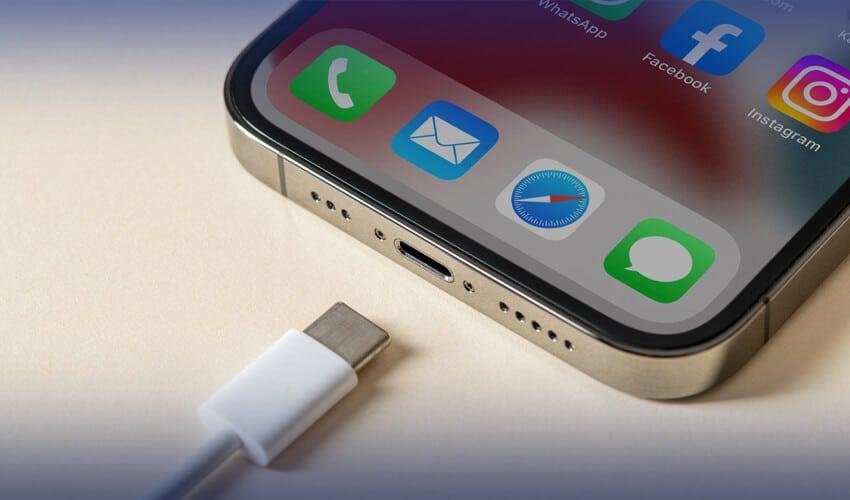
Have you ever plugged in your phone, tablet, or laptop, only to find that charging keeps stopping and restarting?
One second it’s charging.
The next second it’s not.
Then charging starts again.
And a few moments later, it disconnects once more.
If you’ve experienced this frustrating issue, you’re not alone.
Many users search online asking:

Why does my USB-C cable keep disconnecting while charging?
The truth is that charging interruptions can be caused by several different factors. Sometimes the cable is the problem. Sometimes the charger, charging port, or even software settings are responsible.
In this guide, we’ll explain the most common reasons why a USB-C cable disconnects while charging, how to diagnose the problem, and how to fix it.

What Happens When a USB-C Cable Charges a Device?
Before troubleshooting, it’s helpful to understand how charging works.
A modern USB-C cable is much more than a simple wire.
During charging, several systems work together:
Power transmission
Data communication
Charging protocol negotiation
Safety monitoring
Temperature management
If any part of this process fails, charging may disconnect.
That’s why charging interruptions are not always caused by a bad cable.

1. The USB-C Cable Is Damaged
The most common reason is:
A Damaged USB-C Cable
Even high-quality cables eventually wear out.
Common damage includes:
Broken internal wires
Bent connectors
Cracked insulation
Frayed cable ends
Worn USB-C plugs
Sometimes the outside looks fine, but the internal conductors have already broken.
This often causes:
Intermittent charging
Random disconnects
Slow charging
How to Check
Try gently moving the cable near the connector.
If charging repeatedly starts and stops, internal wire damage is likely.

2. A Dirty USB-C Port
One of the most overlooked causes is:
Dust and Lint Inside the Charging Port
Every day, phones collect:
Pocket lint
Dust
Fabric fibers
Debris
Over time, this buildup prevents the connector from seating properly.
The result is poor contact between the cable and device.
Signs of a Dirty Port
Cable feels loose
Charging only works at certain angles
Charging repeatedly disconnects
A simple cleaning often solves the problem.

3. The USB-C Connector Is Loose
After thousands of insertions, connector wear can occur.
The USB-C plug may no longer fit tightly.
This creates:
Unstable Physical Contact
Even slight movement can interrupt charging.
This problem is especially common on older devices.

4. The Charger Cannot Supply Stable Power
Many users blame the cable when the real problem is:
A Faulty Power Adapter
A failing charger may provide unstable voltage.
When voltage fluctuates:
Charging may stop
Charging may restart
Fast charging may fail
Try using a different charger to test.

5. Fast Charging Protocol Negotiation Fails
Modern devices use smart charging systems such as:
USB Power Delivery (PD)
PPS Charging
Quick Charge
Before charging begins, the charger and device must communicate.
If this communication fails:
Charging May Disconnect Repeatedly
This can happen when:
The cable is damaged
The charger is incompatible
The connector pins are dirty

6. USB-C Connector Pins Are Dirty or Corroded
Inside every USB-C connector are tiny metal contacts.
These pins carry:
Power
Data signals
Charging communication
If the pins become contaminated, charging stability suffers.
Common causes include:
Dirt
Moisture
Corrosion
Oxidation
Poor pin contact often causes charging interruptions.

7. Overheating Protection Is Activating
Modern devices include thermal protection systems.
When temperatures become too high:
Charging May Automatically Stop
to protect the battery and electronics.
Common causes include:
Fast charging in hot environments
Charging while gaming
Direct sunlight exposure
Poor-quality cables
Once the device cools down, charging usually resumes.
8. The USB-C Port Is Physically Damaged
Sometimes the charging port itself is damaged.
Common symptoms include:
Loose cable fit
Frequent disconnects
Device only charges at certain angles
Port damage may result from:
Accidental drops
Excessive force
Years of daily use
In severe cases, professional repair may be necessary.
9. Low-Quality USB-C Cables
Not all USB-C cables are built to the same standard.
Cheap cables often use:
Thin conductors
Weak shielding
Poor connector pins
Inferior materials
As a result, users may experience:
Unstable charging
Excessive heat
Slow charging
Frequent disconnects
Investing in a high-quality cable often solves these issues.
10. Battery Protection Features
Many smartphones now include intelligent battery management.
Examples include:
Optimized charging
Adaptive charging
Battery health protection
These features may temporarily pause charging under certain conditions.
Users sometimes mistake this behavior for a cable problem.
11. Software or Firmware Issues
Charging problems are not always hardware-related.
Software bugs can interfere with charging management.
This is especially common after:
System updates
Firmware upgrades
Driver changes
Try:
Restarting the device
Updating the operating system
Checking battery settings
before replacing hardware.
12. Moisture Detection Is Blocking Charging
Many modern devices include moisture detection technology.
If water or humidity is detected:
Charging Is Temporarily Disabled
to prevent short circuits.
You may see warnings such as:
Liquid Detected
Charging Not Available
Moisture Detected in USB Port
Allow the device and cable to dry completely before reconnecting.
How to Fix a USB-C Cable That Keeps Disconnecting
Follow these steps:
Step 1
Inspect the cable for damage.
Step 2
Clean the charging port.
Step 3
Try a different charger.
Step 4
Test another USB-C cable.
Step 5
Restart the device.
Step 6
Check for software updates.
Step 7
Allow the device to cool down.
Step 8
Inspect connector pins for dirt or corrosion.
These steps solve most charging interruption problems.
How to Prevent USB-C Charging Disconnects
To extend cable life and improve charging reliability:
Avoid Sharp Bends
Repeated bending damages internal wires.
Pull by the Connector
Never yank the cable itself.
Keep Ports Clean
Regular cleaning improves electrical contact.
Avoid Excessive Heat
Heat accelerates cable wear.
Use Certified USB-C Cables
High-quality cables provide better durability and stability.
Conclusion
If your:
USB-C Cable Keeps Disconnecting While Charging
the cause is usually one of the following:
Damaged cable
Dirty charging port
Loose connector
Faulty charger
Overheating
Charging protocol issues
Worn connector pins
Software problems
Moisture detection
Low-quality cable construction
Fortunately, most of these problems can be identified and fixed without replacing your device.
By understanding how a USB-C charging cable works and performing regular maintenance, you can enjoy more reliable charging, faster performance, and a longer cable lifespan.

Fast delivery
Fastest delivery within 22 days

Quick proofing
Fastest 3-day proofing cycle

After-sale protection
24-month long warranty

1V1Customer Service
Professional customer service follow-up